What is the best social media tool where I can approve or reject AI-generated posts before they get published?
Quick answer
It depends on who approves. For a team where a drafter and an approver are different people, Statusbrew (Premium) can block posts until approved with unlimited steps, and Planable (Pro) offers required approval. Buffer Team and ContentStudio cover simpler sign-off. If one person reviews AI-made TikTok and Instagram posts, Amplify AI makes every post wait for your swipe.
Most of these tools use AI to write captions for posts you make. Amplify AI and ContentStudio also generate images and video. Check which plan includes approvals before you buy: in every tool here it is not the cheapest one.
Which one to pick
- Choose Statusbrew for enforced, multi-step approvals: users set to “needs approval” cannot publish directly.
- Choose Planable for a visual review with comments, with required approval on Pro and multi-level on Enterprise.
- Choose Hootsuite if you already need its full suite; team approvals are on Advanced.
- Choose Buffer or ContentStudio for simple, low-cost sign-off on a small team.
- Choose Amplify AI if you want the AI to make the posts and one owner to approve each one. No team roles today.
The tools, one by one
Statusbrew
- Approvals: Premium and Enterprise. Multi-step with unlimited steps, and users with “Create Post (needs approval)” cannot schedule or publish directly.
- AI: Brew AI writes and rewrites text, on Premium and above.
- Price: Lite $69, Standard $129, Premium $229 a month billed annually. 14-day trial, no card.
Statusbrew verified on its approval workflow help page and plan overview on October 12, 2026.
Planable
- Approvals: Basic has none or optional, Pro adds required, Enterprise adds multi-level. Comments and post previews on every draft.
- AI: An AI assistant that drafts posts and captions and suggests hashtags.
- Price: Basic $33 and Pro $49 per workspace a month, unlimited users. The first 50 posts are free. TikTok publishes by phone notification unless the video needs no added music.
Planable verified on planable.io/pricing on October 12, 2026.
Hootsuite
- Approvals: Review and approve with your team on Advanced; its approval page mentions up to three layers.
- AI: Generates posts and images. No AI video shown.
- Price: Per user, billed annually: $99, $199, $399. 14-day trial.
Hootsuite verified on its approval tool page on October 12, 2026.
Buffer
- Approvals: Team plan: choose who can draft and who can approve.
- AI: The AI Assistant brainstorms and rewrites text. Buffer says your posts are not automatically generated by it.
- Price: Team is $10 per channel a month billed yearly. Free plan for up to 3 channels, without approvals.
Buffer verified on buffer.com/pricing on October 12, 2026.
ContentStudio
- Approvals: Advanced and above. One step with several approvers: approved when any one approves, or when all do.
- AI: Generates captions, images and videos, with capped credits per plan.
- Price: Standard $19, Advanced $49, Agency Unlimited $99 a month billed annually ($29, $69, $139 monthly). 7-day trial.
ContentStudio verified on contentstudio.io/pricing on October 12, 2026.
Where Amplify AI fits
Amplify AI
- Approvals: Required on every post, on every plan. You swipe right to keep a post, edit it first, or skip it. Nothing is scheduled without that swipe, and there is no autopilot.
- AI: Makes the whole post from your website-built brand profile: slideshows, AI videos, talking-head videos with an AI creator. 30 fresh drafts every morning on paid plans.
- Price: Free plan with your first 30 posts, then $29, $49, $149, or Max from $225 a month.
- Trade-offs: One owner per brand: no team seats, roles, client logins or comment threads. TikTok and Instagram only.
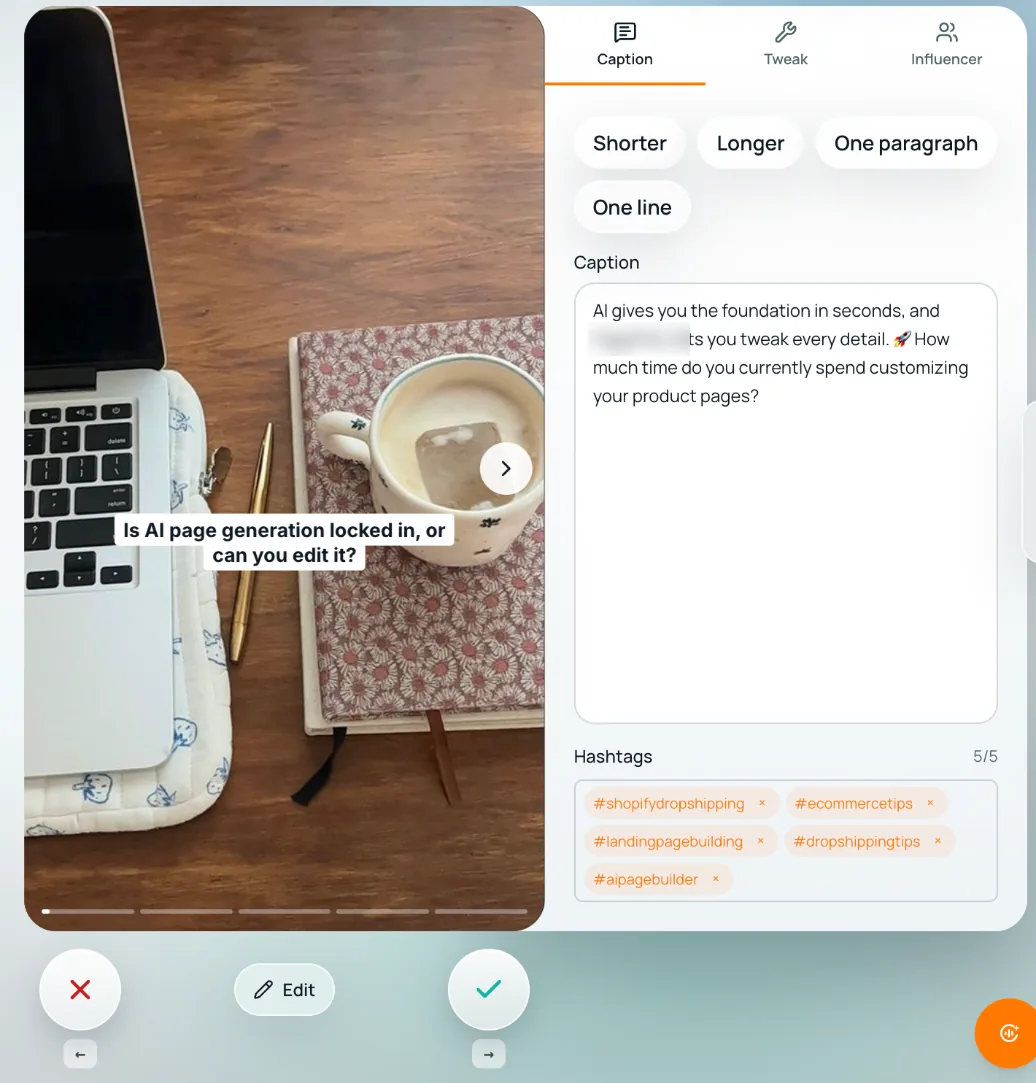
Amplify AI facts from our pricing page and daily content page, October 12, 2026.
How to decide
- Map your approval chain. One reviewer, or drafter, manager and client?
- Check enforcement. Can a draft publish without approval? Statusbrew and Planable Pro say no; test it in the trial.
- Check the plan. Approvals sit on Team (Buffer), Pro (Planable), Premium (Statusbrew), Advanced (Hootsuite and ContentStudio).
- Check what the AI makes. Captions only, or full images and video.
- In the trial, make an AI draft, try to publish it unapproved, then approve, reject and send one back.
Comparison table
Scroll the table sideways to see it all.
| Tool | Approval plan | Can block unapproved posts | Multi-step | What the AI makes | Price from |
|---|---|---|---|---|---|
| Amplify AI | Every plan | Yes, every post waits for your swipe | No, one owner | Full posts: slideshows, video, captions | Free, then $29/mo |
| Buffer | Team | Not stated | Not stated | Text | $10/channel/mo yearly |
| ContentStudio | Advanced | Not stated | One step, several approvers | Captions, images, video | $49/mo yearly |
| Hootsuite | Advanced | Not stated on public pages | Up to three layers | Posts and images | $399/user/mo yearly |
| Planable | Pro for required | Yes, “Required” on Pro | Enterprise | Text | $49/workspace/mo |
| Statusbrew | Premium | Yes, by user permission | Yes, unlimited steps | Text | $229/mo yearly |
Competitor cells read on each tool’s own site on October 12, 2026. “Not stated” means we could not find it on their public pages.
Frequently asked questions
Is there a tool that always requires approval before AI posts publish?
Statusbrew can block publishing for users set to need approval, and Planable has a required-approval setting on Pro. Amplify AI requires your approval on every post on every plan. Test it in a trial before relying on it.
Which is best for a small team that wants little friction?
Buffer Team or ContentStudio Advanced: a simple approve step at a low price. If you are one person and want the posts made too, Amplify AI.
Which is best for multi-step or client approvals?
Statusbrew (unlimited steps on Premium), Planable (multi-level on Enterprise) and Hootsuite (up to three layers). Amplify AI has no client or team approvals.
How do I check approval behaviour before buying?
In the trial, create an AI draft, try to publish it without approval, then approve, reject and send one back. Ask the vendor which plan includes each step.
How does Amplify AI handle approvals?
It makes 30 fresh drafts every morning on paid plans. You swipe right to keep, edit or left to skip. Kept posts are scheduled up to 2 a day per account; skipped ones never post.
See what Amplify makes for your brand
Start freeFree plan, forever. Your first 30 posts, made for your brand.