How this Freenotes TikTok got 1.3M views
This Freenotes TikTok by @studyw.nixx got 1.3M views, 692× its creator's usual views. It is a product demo video that opens with a demo hook in the first 2 seconds: “Nobody's gonna know” Below: why it worked, every scene and how to make your own.
Why it worked
Watching a plain grid page turn into a neat 'Brain' heading with shapes, a stylish font and a sticker is satisfying, and the 'nobody's gonna know' sound jokes that it looks hand-made when it isn't.
The hook · demo · first 2s
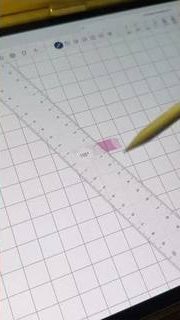
“Nobody's gonna know”On screen: A hand draws a blue rounded shape on a grid page with a wooden-look Apple Pencil; no text on screen, the line comes from the trending sound.
Scene by scene
- A shape is drawn on a grid notebook page and snapped to a rounded rectangle.
- The ruler tool is used, then a blue rectangle is drawn, duplicated and rotated behind itself.
- A white dot and a dashed curve are added to look like a binder ring.
- She opens the writing font menu with 'Real-time handwriting beautification enabled' and writes 'Brain', which turns into script lettering.
- She drags a brain illustration in from another app and places it beside the title.
How to make your own
Film over your iPad as you build a title block step by step with shapes, the ruler, a handwriting-beautify font and a dragged-in image, set to a trending sound; name the app in the caption.
Quick answers
What hook did this Freenotes TikTok use?
A demo hook in the first 2 seconds: “Nobody's gonna know” On screen it showed: A hand draws a blue rounded shape on a grid page with a wooden-look Apple Pencil; no text on screen, the line comes from the trending sound.
Why did this Freenotes TikTok go viral?
Watching a plain grid page turn into a neat 'Brain' heading with shapes, a stylish font and a sticker is satisfying, and the 'nobody's gonna know' sound jokes that it looks hand-made when it isn't.
How do I make a TikTok like this for my app?
Film over your iPad as you build a title block step by step with shapes, the ruler, a handwriting-beautify font and a dragged-in image, set to a trending sound; name the app in the caption.
Post every day, without filming
This one took a creator, a camera and an edit. Amplify makes slideshows about your app from what's going viral in your niche and posts them every day. Paste your website and your first posts are free.
Up to 60 posts a month, made and posted for you on your TikTok and Instagram. You approve each one, or let it post on its own.
Caption
Freenotes 🔛🔝
Tagged
Original by @studyw.nixx on TikTok, promoting Freenotes. iPad note-taking app with shapes, a ruler, an AI assistant and handwriting fonts; the name appears only in the caption ('Freenotes').