AI influencer for your brand
Quick answer
An AI influencer is a consistent made-up creator for your brand: one name, one face and one style, showing up in your posts every day. On Amplify, your AI creator appears in the slideshows each of your agents posts, so every account feels like the same person runs it. Label posts made with an AI creator as AI-generated, as TikTok and Instagram ask. You can put yourself in the posts instead, or switch faces off, with no talent fees and no shoot days either way.
What is an AI influencer for a brand?
An AI influencer is a creator who does not exist as a real person but behaves like one on your feed. They have a name, a look, a background and a style, and they show up the same way in every post. For a brand, that means the account reads as one person talking to viewers, not a logo posting.
People follow people. A brand account that keeps changing faces and tone feels like a stranger each time. A single creator gives viewers someone to recognise, and gives you something to build on week after week. Our features overview shows where this fits with the rest of Amplify.
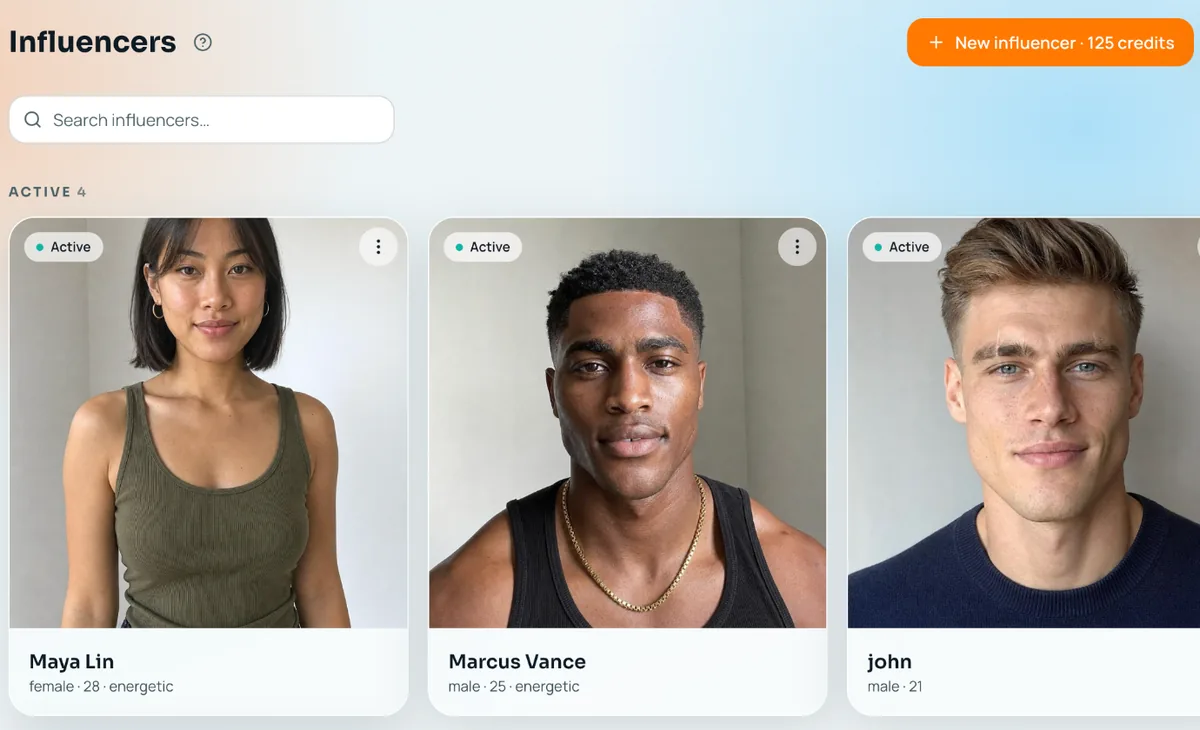
How do you set up an AI creator on Amplify?
Setting up a creator takes one short brief. Start from one of the ready-made faces, or describe the creator you want. Amplify fills in the rest, and you can change anything you don't like.
- Pick a ready-made face, or describe the creator you want in one short brief.
- Amplify fills in a name, identity, look, background, voice, content style and boundaries. Prefer to do it yourself? Set each one by hand.
- Generate a face or upload a photo, then pick the main portrait.
- Save it. Designing a creator uses credits once, and only once. From then on, your agents can put your creator in the slideshows they post.
What can your AI creator actually do?
Once your creator exists, the same face and voice carry through everything your agents and you make. The point is that your feed looks like one person runs it. Label posts made with an AI creator as AI-generated, as TikTok and Instagram ask.
- Show up in the slideshows each of your agents posts, with the same face from post to post.
- Appear on every account you run. Deploy an agent for each account and the same creator can be in all of them.
- Open your videos. With the Hook & Demo Agent add-on, each video can start on your AI creator before your own demo clip plays. See AI UGC videos.
- Show up in wall-of-text posts, AI videos and photo reels you make yourself in Studio, using credits.
- Star in recreated viral videos you make in Studio, in front of your product or in the trend itself. See copy any post.
- Speak to camera in talking head videos you make in Studio, with their generated voice, from 4 to 30 seconds. See AI UGC videos.
- Make the same idea for 2 or more creators at once, if you want to test which face lands.
- Step into a video you remix. Your creator keeps the original face movement and head turns, and is placed in a clean version of the original scene.
- Step aside when you want. You can put yourself in the posts instead, or switch faces off.
AI influencer vs hiring UGC creators vs filming yourself
Each route works. They differ in what you have to manage.
| AI influencer on Amplify | Hiring UGC creators | Filming yourself | |
|---|---|---|---|
| Who is on screen | One consistent creator you design, or a ready-made face you pick | A different person per job, unless you keep paying the same one | You, or someone on your team |
| Setup | A short brief, then a face and a portrait | Finding, briefing and paying each creator | Nothing to set up, but you are the bottleneck |
| Cost | Part of each agent, $49 or $149 a month. Studio extras use credits | Talent fee on every piece | Your time |
| Shoot days | None | Creator schedules and shipping | You pick a day and shoot |
| Consistency | Same face and voice across every post | Changes whenever the creator changes | Consistent, as long as you keep showing up |
| Volume | Up to 60 slideshows a month for each agent | Limited by each creator's turnaround | Limited by how often you can film |
| Real human trust | A made-up creator, so you check what they say | Real person, real opinions | Real person, and it's you |
If your brand is built on your own face and story, put yourself in the posts and let your agents handle the rest of the feed. If you want a steady presence that does not depend on anyone's schedule, an AI creator is the simpler path. Starting a new account from zero? Read how an agent runs one for you in warmed accounts.
How does it fit with your agents?
Your creator is the face of every agent you deploy. On "You pick", fresh posts with your creator in them wait for you every morning in Turbo, a swipe deck, and nothing goes out unless you keep it. On "Posts on its own", the agent books posts ahead and gives you a heads-up, so you can swap or skip any. Read how that works in daily content and auto posting.
Worth knowing
You can put your creator's own face into a post or video. Swapping in an arbitrary real person's face is not offered, so you can't make a post that looks like someone else.
An AI creator is not a real human with real experiences. Check what they say as you would for any spokesperson. Amplify is in beta, and videos you make yourself in Studio use credits.
Pricing
You can see your first posts free, with no card. An agent on your own account is $1 for your first 14 days (about 21 posts), then $49 a month until you cancel. An agent on a warmed account is $149 a month. Each agent makes up to 60 slideshows a month and comes with 400 credits: its own posts, plus about 20 of yours. Running 10 or more agents? We build the plan with you on a demo call. See pricing.
Frequently asked questions
Do I need to show my own face?
No. Your AI creator can be the face, so you never have to film. You can also put yourself in the posts instead, or switch faces off.
Can I make my own creator instead of using a ready one?
Yes. Describe it in one short brief and Amplify fills in the details, or set every detail by hand. Then generate a face or upload a photo.
Can one creator post on more than one account?
Yes. Deploy an agent for each account and the same creator can appear in all of them. With Max agents you can run as many agents as you want, on one bill.
Can I use a celebrity or a real person's face?
No. You can only put your own creator's face into a post or video. Swapping in an arbitrary real person's face is not offered.
Is the creator's voice generated too?
Yes. Talking head videos you make in Studio use your creator's generated voice, from 4 to 30 seconds.
Can my creator appear in videos too?
Yes. With the Hook & Demo Agent add-on, $39 a month per agent, each video can open on your AI creator before your demo clip plays. You can also make videos with your creator yourself in Studio, using credits.
Meet your brand's creator in your first posts.
Start for $1$1 for 14 days, then $49/mo. Paste your website and see your first posts in a few minutes.