How this Everygen TikTok got 1.3M views
This Everygen TikTok by @yoitsloyal got 1.3M views, 502× its creator's usual views. It is a screen recording video that opens with a bold claim hook in the first 3 seconds: “Part time job 🚫 AI YouTube Channel ✅” Below: why it worked, every scene and how to make your own.
Why it worked
The on-screen math ($500 x 30 = $15,000) beats a part-time job in one glance, and the steps are short and specific enough to follow right away.
The hook · bold claim · first 3s
“Part time job 🚫 AI YouTube Channel ✅”On screen: The creator in glasses at his desk with '$500', '$500 x 7 = $3500' and '$500 x 30 = $15,000' stacked beside him.
Scene by scene
- Talking head with the income math overlay: don't get a part-time job, do this instead.
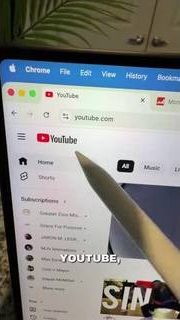
- Filmed monitor: YouTube, search a popular streamer, open a recent video and copy the link.
- He goes to everygen.ai/mcp and adds Everygen as a custom connector in Claude.
- He asks Claude, using Everygen, to analyze the video's viral moments and cut them into clips.
- Clips come back to pick from, he chooses captions, and a clip is ready to post.
How to make your own
Open with a 'Part time job ❌ / X ✅' text and income math over your face, then film your screen step by step with a pen pointing at each click.
Quick answers
What hook did this Everygen TikTok use?
A bold claim hook in the first 3 seconds: “Part time job 🚫 AI YouTube Channel ✅” On screen it showed: The creator in glasses at his desk with '$500', '$500 x 7 = $3500' and '$500 x 30 = $15,000' stacked beside him.
Why did this Everygen TikTok go viral?
The on-screen math ($500 x 30 = $15,000) beats a part-time job in one glance, and the steps are short and specific enough to follow right away.
How do I make a TikTok like this for my app?
Open with a 'Part time job ❌ / X ✅' text and income math over your face, then film your screen step by step with a pen pointing at each click.
Post every day, without filming
This one took a creator, a camera and an edit. Amplify makes slideshows about your app from what's going viral in your niche and posts them every day. Paste your website and your first posts are free.
Up to 60 posts a month, made and posted for you on your TikTok and Instagram. You approve each one, or let it post on its own.
Transcript
Read the full transcript (138 words)
Every day, every week, every month. Don't get a part-time job, just do this instead. Go to YouTube, search up any popular streamer, click on any of their recent videos, and then copy the link. Go to everygen.ai slash mcp and then click this. It'll bring you to Claude, so just click continue. Now Everygen is connected to your Claude. Now you're going to ask Claude, using Everygen, analyze this video's most viral moments and cut them into clips, and then paste that video. Give it two to three minutes. It'll give you a bunch of clips, select a few of them, and then click continue. Pick whatever captions you like, and now you have a clip ready to post to your channel. Upload a few of these every single day, and you'll get payouts just like this.
Caption
never underestimate clipping
Tagged
Original by @yoitsloyal on TikTok, promoting Everygen. AI video tool added to Claude as a custom connector that finds a video's most viral moments and cuts them into captioned clips.