How this Da Vinci Eye TikTok got 690K views
This Da Vinci Eye TikTok by @moonline.ar got 690K views, 20.5× its creator's usual views. It is a product demo video that opens with a result first hook in the first 2 seconds: “No on-screen text or speech; the first text is the app's 'Back / Tools' menu” Below: why it worked, every scene and how to make your own.
Why it worked
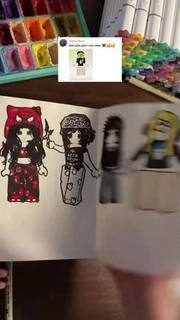
It opens on a finished grid of colourful anime drawings, then shows the trick behind them, a phone overlaying the image on paper, so viewers think they could do it too.
The hook · result first · first 2s
“No on-screen text or speech; the first text is the app's 'Back / Tools' menu”On screen: A grid of four finished hand-coloured anime portraits lies on the desk, then an empty paper square appears in the gap.
Scene by scene
- A grid of finished anime character drawings on a desk, with one empty paper square.
- The anime reference image is flashed on the blank square.
- Her phone shows the Da Vinci Eye view with the image overlaid at low opacity, and she adjusts the Opacity slider.
- She traces the face outline in pencil while looking through the phone.
- She colours the finished line drawing with an orange marker next to the other drawings.
How to make your own
Start with your finished drawings on the desk, flash the reference image, then film from above as your phone on a stand shows the image at low opacity over paper while you trace and colour it.
Quick answers
What hook did this Da Vinci Eye TikTok use?
A result first hook in the first 2 seconds: “No on-screen text or speech; the first text is the app's 'Back / Tools' menu” On screen it showed: A grid of four finished hand-coloured anime portraits lies on the desk, then an empty paper square appears in the gap.
Why did this Da Vinci Eye TikTok go viral?
It opens on a finished grid of colourful anime drawings, then shows the trick behind them, a phone overlaying the image on paper, so viewers think they could do it too.
How do I make a TikTok like this for my app?
Start with your finished drawings on the desk, flash the reference image, then film from above as your phone on a stand shows the image at low opacity over paper while you trace and colour it.
Post every day, without filming
This one took a creator, a camera and an edit. Amplify makes slideshows about your app from what's going viral in your niche and posts them every day. Paste your website and your first posts are free.
Up to 60 posts a month, made and posted for you on your TikTok and Instagram. You approve each one, or let it post on its own.
Caption
App name : da vinci eye✨💕
Tagged
Original by @moonline.ar on TikTok, promoting Da Vinci Eye. AR tracing app that projects a reference image through the phone camera onto paper with adjustable opacity so you can trace it; the name is in the caption.